
How I worked with Docker profiles?
Highlighting my recent experience working with Docker profiles to execute scripts on different blockchain environments.

I was working on a script that is supposed to be executed on Ethereum mainnet and do some operations like Deposit some tokens in a Defi vault and then withdraw them too, get some on-chain data and show it works successfully.
Now I wanted it to work for other people too who just take a pull from my repo and try to run this script. So naturally I used Docker to make it easier for anyone to do this.
Now doing some write operations on Ethereum mainnet costs real money, which I only have some. So you can create a fork of the actual network and start a local node to simulate the real network and have the script perform write operations on the fork.
The fork doesn’t costs you real money, and you can do a lot of stuff there. But in brief it allows you to simulate transactions in a way that the real network would without costing real money.
So naturally I wanted all this to happen using a single command and different execution profiles. So the script’s code remains the same, but I would like to execute it in a fork mode, then on mainnet mode whenever I want.
To work with the fork mode I first started with 2 terminal sessions where one executes the script commands and other runs the forked network node. So this is a 2 step process normally. But with docker profiles I was able to do this in a single command.
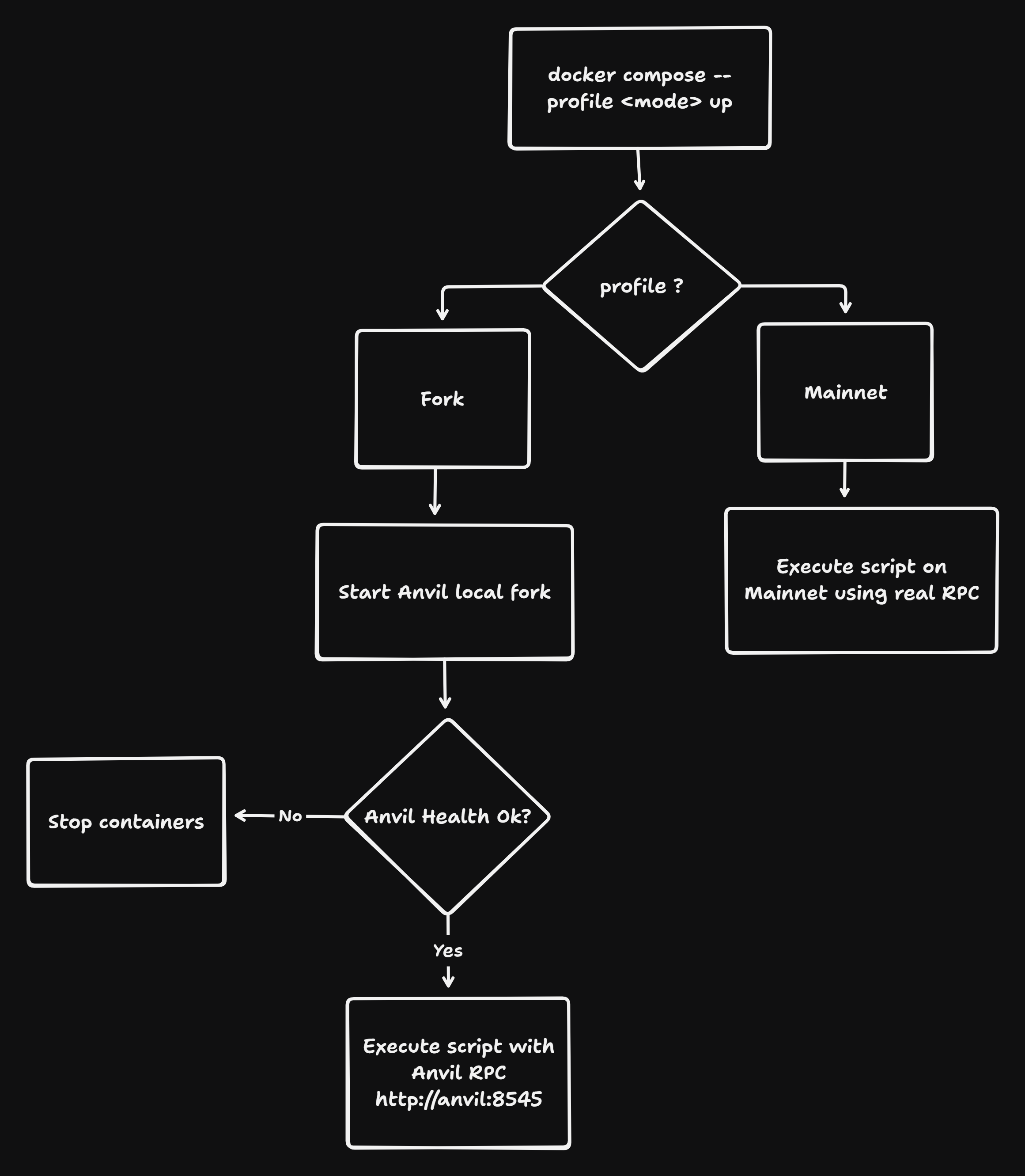
Here is where Docker profile was really helpful as it allowed me to switch between environments in which the script should execute, mainnet or fork.
Here is the docker-compose.yml which shows how I used profiles
services:
  anvil:
    build:
      context: .
      dockerfile: Dockerfile.anvil
    container_name: lombard-anvil
    command:
      - --host
      - "0.0.0.0"
      - --port
      - "8545"
      - --fork-url
      - ${RPC_URL}
      - --silent
    ports:
      - "8545:8545"
    healthcheck:
      test:
        - CMD
        - cast
        - block-number
        - --rpc-url
        - http://127.0.0.1:8545
      interval: 3s
      timeout: 3s
      retries: 10
      start_period: 5s
    profiles:
      - fork

  # fork mode
  app-fork:
    build: .
    container_name: lombard-app-fork
    env_file:
      - .env
    environment:
      - RPC_URL=http://anvil:8545
      - PRIVATE_KEY=${PRIVATE_KEY}
    depends_on:
      anvil:
        condition: service_healthy
    command: ["${TOKEN_ADDRESS}", "${TOKEN_AMOUNT}"]
    profiles:
      - fork

  # mainnet mode
  app-mainnet:
    build: .
    container_name: lombard-app-mainnet
    env_file:
      - .env
    environment:
      - RPC_URL=${RPC_URL}
      - PRIVATE_KEY=${PRIVATE_KEY}
    command: ["${TOKEN_ADDRESS}", "${TOKEN_AMOUNT}"]
    profiles:
      - mainnet
So this compose has 3 services anvil, app-fork and app-mainnet.
Anvil is the service that forks the Ethereum mainnet latest state and runs a local blockchain node. This is perfect for doing the scripts simulation where I don’t want to spend real money.
The app-fork service initializes the requirements to run the script and makes sure that anvil fork is up and running first before executing the script. It also overwrites the environment variable RPC_URL to use anvil’s rpc and not the mainnet one so the transactions goes to the anvil node and not the real ethereum node.
Lastly the app-mainnet simply runs the script in mainnet mode, it doesn’t need an anvil local node running as it has the live RPC_URL from the .env to send transactions to the Ethereum network. This costs real money.
With this compose and using commands like below I am able to switch between environments easily in which I want to execute my script.
To execute in fork mode:
docker compose --profile fork up --build --abort-on-container-exit --exit-code-from app-forkTo execute in mainnet mode:
docker compose --profile mainnet up --buildHere is the link to the repo of the script I was talking about: https://github.com/aditya172926/lombard-vault-challenge
Hope this gives you a better idea about working with Docker profiles.